Make Your Website Work Better.
Website Optimization Services help businesses build faster, easier-to-use and more effective online experiences. A website should do more than look attractive. It should help visitors understand your offer, find what they need and take the next step with confidence.
Brand Orbit brings together performance thinking, usability and practical improvements to help businesses strengthen their digital presence.
Discuss Your Website
Website Optimization Services for a Stronger Digital Experience
A website often creates the first meaningful impression of a business. Visitors may arrive through search engines, social media, an online advertisement or a direct recommendation. What happens after they land on the page can influence whether they stay, explore or leave.
Website Optimization Services focus on identifying and improving the factors that affect this experience. These may include loading speed, mobile usability, navigation, page structure, accessibility, technical health and the clarity of important information.
Optimization is not simply about adding visual effects or making every page look different. It is about removing friction. Visitors should be able to understand the business, locate relevant information and complete useful actions without unnecessary confusion.
For Brand Orbit, the aim is to connect thoughtful design with practical performance improvements. The right changes depend on the website, its audience, its current problems and the goals the business wants to achieve.
Table of Contents
Why Website Optimization Services Matter
A website can attract visitors and still struggle to turn that attention into meaningful engagement. Slow pages, unclear navigation, hard-to-read text or confusing forms can create obstacles between a visitor and the information they need.
Make information easier to find
Clear navigation and logical page structure help visitors understand where they are and where to go next. When important information is easy to locate, people can make more informed decisions without searching through unrelated content.
Create a smoother experience
Consistent layouts, readable typography, helpful buttons and accessible content reduce unnecessary effort. A smoother experience makes it easier for people to explore your services and understand your business.
Support organic search visibility
Technical health, helpful content, mobile usability and page experience contribute to a website that is easier to access and understand. Optimization should complement useful content and sound SEO practices, not replace them.
Improve the path to action
Visitors should be able to find a relevant next step, whether that means reading another page, requesting a quote, booking a consultation or contacting the business. Clear calls to action help communicate those choices.
The value of optimization is not measured by appearance alone. It comes from understanding what users need, identifying the barriers they face and making changes that can be evaluated over time.
Our Website Optimization Services
Every website has a different combination of strengths and weaknesses. We begin with the actual experience and prioritize improvements according to their relevance, feasibility and potential impact.

Website performance review
A performance review looks for issues that may affect loading, rendering and interaction. Large images, unnecessary scripts, inefficient page elements and excessive third-party tools can all contribute to a slower experience.
We identify the areas that deserve attention and help establish a practical improvement plan. Not every website needs the same technical changes, so recommendations should reflect the platform, configuration and existing setup.
Page speed optimization
Page speed work may include resizing and compressing images, choosing suitable image formats, reviewing caching, reducing unnecessary code and checking how resources load. Changes must be tested to make sure they improve performance without breaking layouts or important features.
Mobile website optimization
Mobile visitors need readable text, appropriately sized controls, responsive layouts and forms that work on smaller screens. We review the mobile experience and look for horizontal overflow, crowded sections, difficult buttons and other usability issues.
User experience improvements
User experience optimization focuses on the journey through a website. We review navigation labels, page hierarchy, content readability, links, buttons and the steps required to complete important actions. The goal is to make the next step clearer, not to add unnecessary design elements.
Conversion path review
A conversion may be a contact form submission, enquiry, appointment request or another meaningful action. We look for friction around these actions, such as unclear button text, overly complicated forms or missing information that visitors need before making a decision.
Technical website checks
Technical checks may include broken links, redirect issues, indexability, duplicate page concerns, sitemap access and mobile rendering. The appropriate checks depend on the website's size and technology. Significant changes should be tested before being applied to a live website.
Content structure and readability
Useful headings, concise paragraphs, descriptive link text and clear page sections help visitors scan information. Content should answer real questions, explain services accurately and guide readers without excessive repetition or keyword stuffing.
These website optimization services can work alongside SEO services , social media marketing and paid advertising. Each channel can bring visitors to a website, while the website experience helps them understand the offer and decide what to do next.
Website Speed Optimization and Core Web Vitals
Website speed influences how quickly a page becomes useful to a visitor. A page that takes too long to display its main content or respond to interaction can feel frustrating, especially on a mobile connection or a less powerful device.
Google's Core Web Vitals provide a useful framework for evaluating parts of the real user experience. They include loading performance, responsiveness and visual stability. These measurements help teams identify problems that may not be obvious from looking at a page on a fast office connection.
- Largest Contentful Paint (LCP): measures when the main content becomes visible.
- Interaction to Next Paint (INP): measures responsiveness across user interactions.
- Cumulative Layout Shift (CLS): measures unexpected visual movement during loading.
Use Google PageSpeed Insights to inspect a page and review its available performance data. The report can highlight opportunities, but recommendations should be interpreted in the context of the actual website.
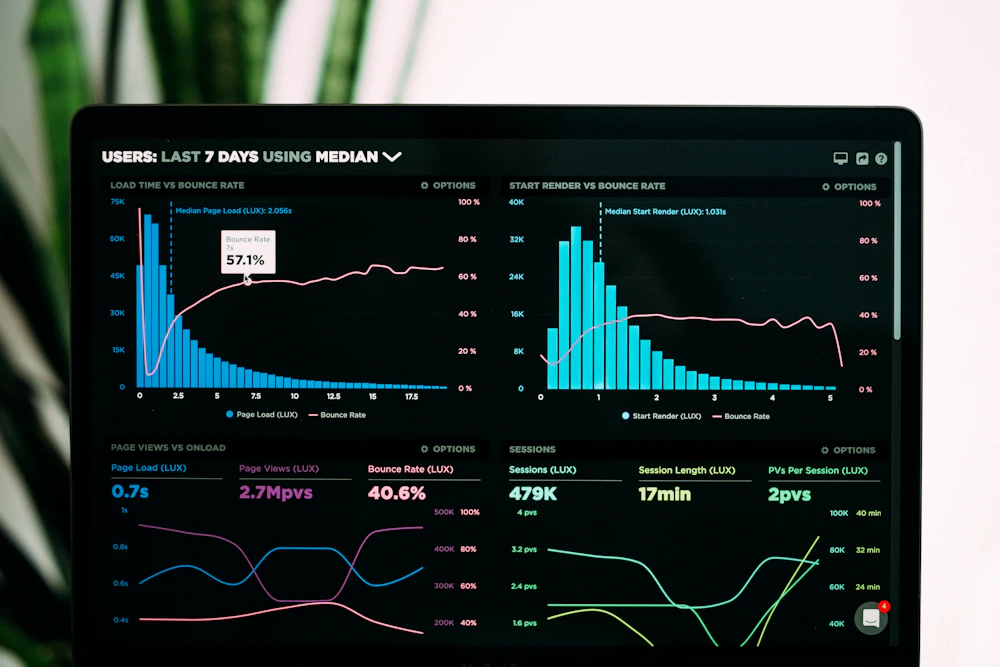
Practical Ways to Improve Page Speed
Optimize images and media
Images often occupy a substantial part of a page. Use appropriately sized images, compress files, choose efficient formats where supported and avoid loading large media when a smaller asset will do. Give images explicit dimensions where possible to reduce layout movement.
Review scripts and page elements
Tracking scripts, animations, embedded content and plugins can add work for the browser. Review whether each element is necessary. Remove unused features carefully and test important forms, menus, analytics and integrations after making changes.
Use caching and efficient delivery
Suitable caching and content delivery settings may reduce repeated work and help resources reach visitors efficiently. The right configuration depends on the host, content management system and other optimization tools already in place.
Test before and after
Record the initial results, make a focused change and test again under comparable conditions. A single score is not the whole story. Check real usability, important page elements and multiple templates to understand whether the change helped.
For additional guidance, consult Google's Core Web Vitals documentation and web performance learning resources. These resources explain measurement concepts and optimization approaches in greater technical detail.
Mobile Website Optimization for Everyday Browsing
Visitors may discover a business while travelling, waiting in a queue or browsing between other tasks. A website needs to work comfortably on different screen sizes rather than simply shrinking a desktop layout.
Mobile optimization involves more than making a page fit the screen. Text should remain readable, navigation should be easy to use, and important controls should be accessible without accidental taps. Images and embedded content should fit within the viewport.
What we look for on mobile
- Readable text and a clear heading hierarchy.
- Buttons and links that are comfortable to tap.
- Forms with understandable labels and useful error messages.
- Images that resize without stretching or overflow.
- Navigation that works with touch controls.
- Content that does not depend on hover effects.
We also review whether mobile visitors can quickly reach essential details such as services, pricing information where available, contact options and business information.

Responsive design and consistency
Responsive design allows a layout to adapt to different viewport widths. This can involve flexible columns, suitable spacing, fluid images and breakpoint-specific adjustments. A responsive page should preserve the order and importance of its content instead of hiding essential information just to make the design look tidy.
Testing should include more than one screen width. Check the menu, forms, buttons, page footer and any interactive components. In WordPress and Elementor, review both the responsive settings and the underlying widget or custom CSS that may affect the layout.
User Experience Optimization That Makes the Next Step Clear
A well-designed website helps visitors answer three simple questions: What does this business offer? Is the information relevant to me? What can I do next? When the answers are difficult to find, visitors may leave without understanding the value of the service.
Build a clear visual hierarchy
Headings, body text, spacing, imagery and buttons should work together to show which information matters most. A page does not need every element to be bold or brightly colored. Contrast and whitespace can create a clearer reading path.
Make navigation intuitive
Navigation labels should be specific and familiar. Group related pages logically and avoid making users guess where information might be located. Keep important destinations easy to reach across desktop and mobile experiences.
Write for people who scan
Most service pages benefit from descriptive headings, short paragraphs, meaningful lists and direct language. Explain technical terms when needed and keep claims grounded in what the business can actually provide.
Improve calls to action
Calls to action work best when they describe the next step clearly. “Discuss Your Website” is more informative than a vague button label. Keep the number of competing actions appropriate to the purpose of each page.
Accessibility also matters. Sufficient color contrast, descriptive links, keyboard access, text alternatives for meaningful images and properly labelled forms can make a website easier to use for more people. Follow established guidance such as the Web Content Accessibility Guidelines when planning accessibility improvements.
Technical SEO and Website Content Structure
A website should help search engines discover its important pages and understand what each page covers. Technical SEO supports that process, while useful content gives people a reason to visit and stay informed.
Website Optimization Services may include reviewing indexability, internal links, page titles, heading structure, redirects, broken links, canonical tags and sitemap accessibility. The precise checks depend on the site's current condition and technical setup.
Organize content logically
Use one clear main heading and a meaningful hierarchy of subheadings. Each section should serve a purpose and answer a related question. Avoid using headings only to change the appearance of text.
Strengthen internal links
Link relevant pages where they genuinely help visitors continue their journey. A service page might link to a related service, a useful guide or the contact page. Descriptive anchor text helps people understand what to expect.
Write useful page metadata
Page titles and meta descriptions should accurately represent the content. Include the focus keyword naturally where appropriate, but avoid repetitive wording that makes the snippet less appealing or less clear.
Check crawling and indexing
Review whether important pages can be crawled and indexed, whether unwanted duplicates exist and whether redirects lead to the correct destinations. Do not remove pages or change URLs without considering existing links and redirect requirements.
For official guidance, read Google's SEO Starter Guide and documentation on sitemaps. These explain foundational practices, but following them does not guarantee a specific ranking position.
A Practical Website Optimization Process
Our Website Optimization Services start with diagnosis rather than guesswork. A clear process makes it easier to prioritize work, test changes and understand what should happen next.
Understand the goals
We establish what the website needs to achieve, who it serves and which pages matter most. The goals might include better usability, improved speed, clearer service information or a more straightforward enquiry journey.
Review the website
We examine key pages, mobile layouts, performance indicators, navigation, content structure and relevant technical issues. Findings should be based on observed problems rather than assumptions about what every website needs.
Prioritize improvements
Issues are grouped by importance, effort and potential effect. Critical usability problems and broken functionality should take priority over cosmetic details that have little influence on the visitor experience.
Implement carefully
Changes are made in a controlled way. Backups, staging environments and appropriate access permissions can help reduce risk, particularly for websites with custom code, active forms or business-critical functions.
Test across devices
We check affected pages, responsive layouts, links, forms and important interactions. Performance measurements are repeated where relevant, and visual checks help identify unexpected changes caused by scripts or styles.
Measure and refine
After changes are published, we monitor suitable indicators and review feedback. Optimization is an ongoing process: new content, plugins, integrations and changes in visitor behaviour can introduce fresh opportunities or issues.
How We Evaluate Website Performance
Measuring the impact of Website Optimization Services helps distinguish useful improvements from changes that merely look impressive. The right indicators depend on the purpose of the site and the problems identified during the review.
Performance indicators
- Page loading and responsiveness measurements.
- Core Web Vitals where suitable data is available.
- Mobile usability and layout consistency.
- Broken links, errors and technical issues.
Experience and business indicators
- Engagement with important pages and content.
- Visits to contact and enquiry pages.
- Form completion and other meaningful actions.
- Search visibility and relevant organic traffic trends.
Tools such as Google Analytics and Google Search Console can provide useful information when properly configured. Analytics data should be interpreted carefully, and tracking must respect applicable privacy requirements and user choices.
There is no universal score that proves a website is perfect. A performance test may vary by device, connection, location and time. Similarly, a change in enquiries or search traffic may have multiple causes. Compare relevant measurements over time and avoid promising specific outcomes before evidence supports them.
Why Choose Brand Orbit for Website Optimization Services?
Website improvement works best when technical considerations and the needs of real visitors are considered together. Brand Orbit approaches optimization as part of a wider digital experience, not as an isolated checklist of scores.
Purpose before decoration
We focus on the role each page needs to play. Visual changes should help visitors understand information, recognize important actions or navigate the site more easily.
Practical recommendations
Recommendations should connect an observed issue with a reasonable next step. Clear priorities make it easier to understand what needs attention now and what can be addressed later.
Connected digital marketing
Website performance supports other marketing activities. SEO, social media content and paid campaigns are more useful when the landing pages they point to are clear, relevant and usable.
Careful implementation
Website changes should be tested and documented where appropriate. Protecting existing functionality is as important as improving a score or changing the appearance of a section.
Our approach is collaborative and goal-oriented. We consider the website's current condition, the resources available and the business priorities before deciding which improvements are appropriate. Results depend on the starting point, the changes made and factors beyond the website itself.
Website Optimization Services: FAQs
What are Website Optimization Services?
Website Optimization Services involve reviewing and improving elements that affect a site's performance, usability, mobile experience, technical health and ability to help visitors complete important actions. The exact work depends on the site's needs and goals.
Why is website optimization important?
Optimization can help visitors access information more easily, improve page performance, reduce usability barriers and support a clearer path to enquiry or purchase. It also helps businesses identify technical issues that may affect their website experience.
Does website optimization improve SEO?
Technical improvements, mobile usability, clear site structure and useful content can support SEO. However, optimization does not guarantee higher rankings. Search visibility also depends on content relevance, competition, authority and other factors.
How long does website optimization take?
The timeline depends on the website's size, platform, technical complexity and the number of issues involved. Some straightforward changes can be completed quickly, while extensive development or testing may require more time.
Can you optimize a WordPress website?
WordPress websites can be reviewed for image size, caching, plugin usage, responsive layouts, page structure and other factors. The right approach depends on the hosting setup, theme, page builder and installed plugins. Changes should be tested carefully.
What is the difference between website design and optimization?
Website design focuses on the site's visual presentation, layout and interaction patterns. Optimization evaluates how effectively the website performs and serves users, and it may involve design changes as well as technical, content and usability improvements.
How can I check my website speed?
You can start with Google PageSpeed Insights to review a page's performance and available Core Web Vitals data. Test important pages individually and consider both lab results and real-user information when it is available.
Will optimization guarantee more sales or enquiries?
No responsible provider can guarantee a specific increase without evidence. Optimization can address barriers and improve the visitor experience, but results also depend on the offer, audience, traffic quality, pricing, competition and other business factors.
Should website optimization be ongoing?
Yes, periodic reviews can be useful because websites change over time. New pages, plugins, images, scripts and integrations can affect usability and performance. Monitoring helps identify new issues and decide when further work is worthwhile.
Ready to Improve Your Website?
Let's identify what is working, what needs attention and which improvements make sense for your business. Explore our Website Optimization Services and start a conversation with Brand Orbit about your website goals and priorities.
Discuss Your Website ↗